

SENCLUB / EXAMPLES
Grey-blue room: explore a virtual space by day and night
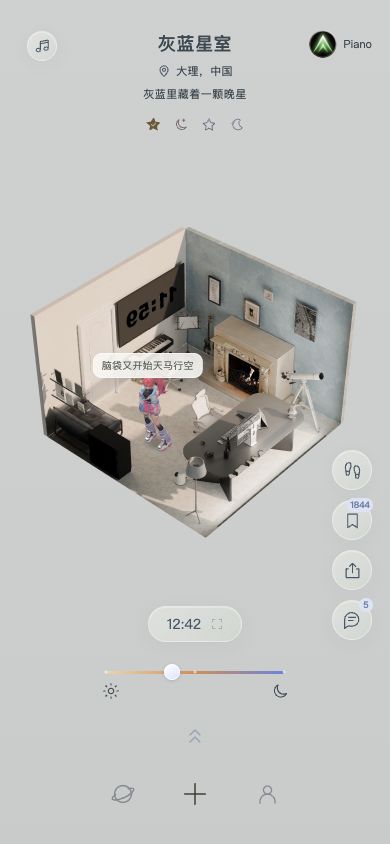
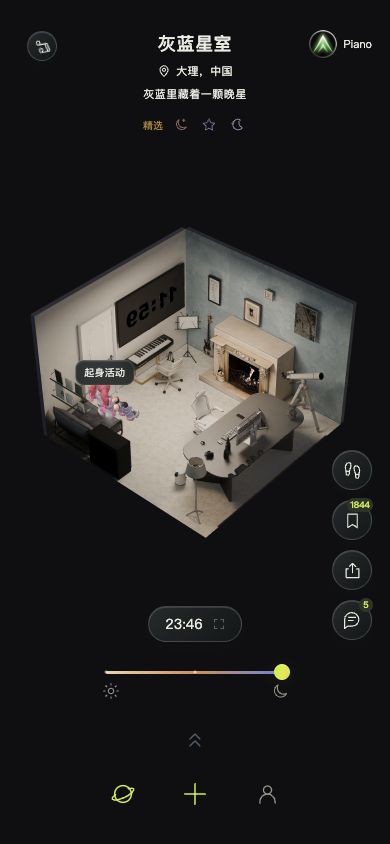
Start with an effect you can inspect yourself. These captures show the same public example room, “灰蓝星室”, in the current mainland China web app, by day and night.
Updated 9 October 2026 · Screenshots: mainland China web app
Look at the layout, then the mood
Notice the relationship between the sofa, piano, fireplace and window area. Grey-blue walls and pale furniture establish the room’s visual palette.
At night, the changed background and lighting draw attention to the room’s outline and local light sources. These are two views of one room, not two separate AI generations.
Try the walkthrough
- Open the web app and browse the public rooms.
- Drag to inspect different angles and the relationship between objects.
- Use the day, night and time controls, then try the room’s available roam entry.
- Choose one layout or mood to explore further, then use the build menu to begin your own work.
What this example demonstrates
This example demonstrates room viewing and day/night previews, captured on 9 October 2026. It is not a claim that a single prompt will reproduce the room, or that every device will perform identically.
The homepage’s inspiration illustrations are labelled as concept imagery. This page uses actual product captures.